ATRIA Wi-Fi 6 Mesh System 3000 UK (2-pack)
All questions
ATRIA Wi-Fi 6 Mesh System 3000 UK (2-pack)
How do I use the Atria Mesh App?
How do I use the AtriaMesh App?
1Connect to the Wi-Fi of the device
Download the application for smartphone "ATRIA MESH" on the App Store or the Google Play Store.

2Browse to the Web UI IP Address
Then you need to be connected to the Wi-Fi of the Mesh with your smartphone and then login to the app with your credentials that should be "admin" and "admin" if you have not changed it.

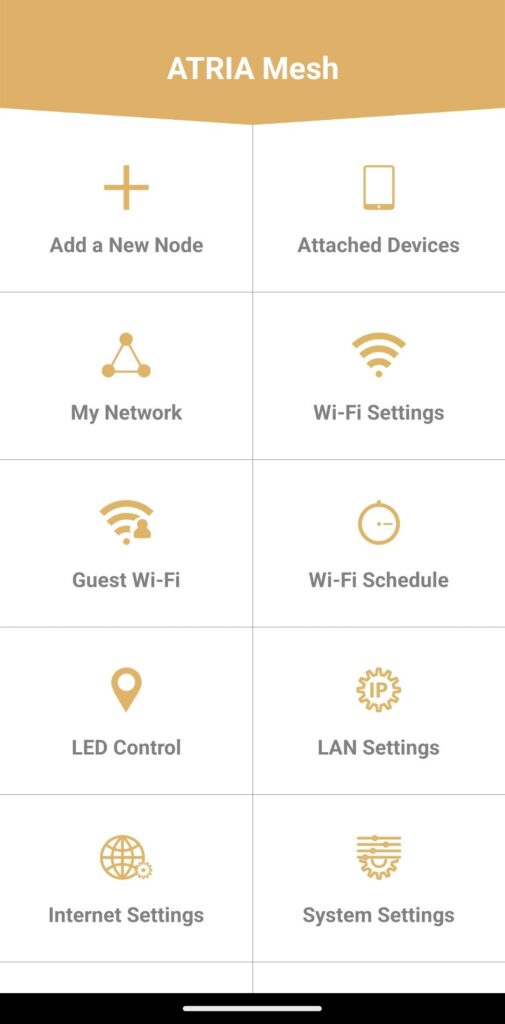
3Main Menu
Now you are on the main page.
• Add a New Node: Where you can add a new Mesh unit to your Mesh Network.
• Attached Devices: Where you can check which devices are connected to your Mesh Network.
• My Network: Where you can check all the Mesh units connected to your Mesh Network.
• Wi-Fi Settings: Where you can edit and modify the SSID (Wi-Fi Network Name) and Password of your Wi-Fi Mesh Network.
• Guest Wi-Fi: Where you can set-up and configure a 2.4GHz or a 5GHz Guest Wi-Fi.
• Wi-Fi Schedule: Where you can schedule a time period activation for your Wi-Fi Network.
• LED Control: Where you can turn ON or OFF the LEDs of your Mesh unit.
• LAN Settings: Where you can enable or disable a DHCP.
• Internet Settings: Where you can configure a DHCP Connection, a manual DNS, a PPPoE and set-up a Static IP.
• System Settings: Where you can modify the Administration User name and Password to access the App.