ATRIA Wi-Fi 6 Mesh System 3000 UK (2-pack)
No items found.
No items found.
All questions
ATRIA Wi-Fi 6 Mesh System 3000 UK (2-pack)
No items found.
No items found.
What are the different ports used for?
1Connect to the Wi-Fi of the device
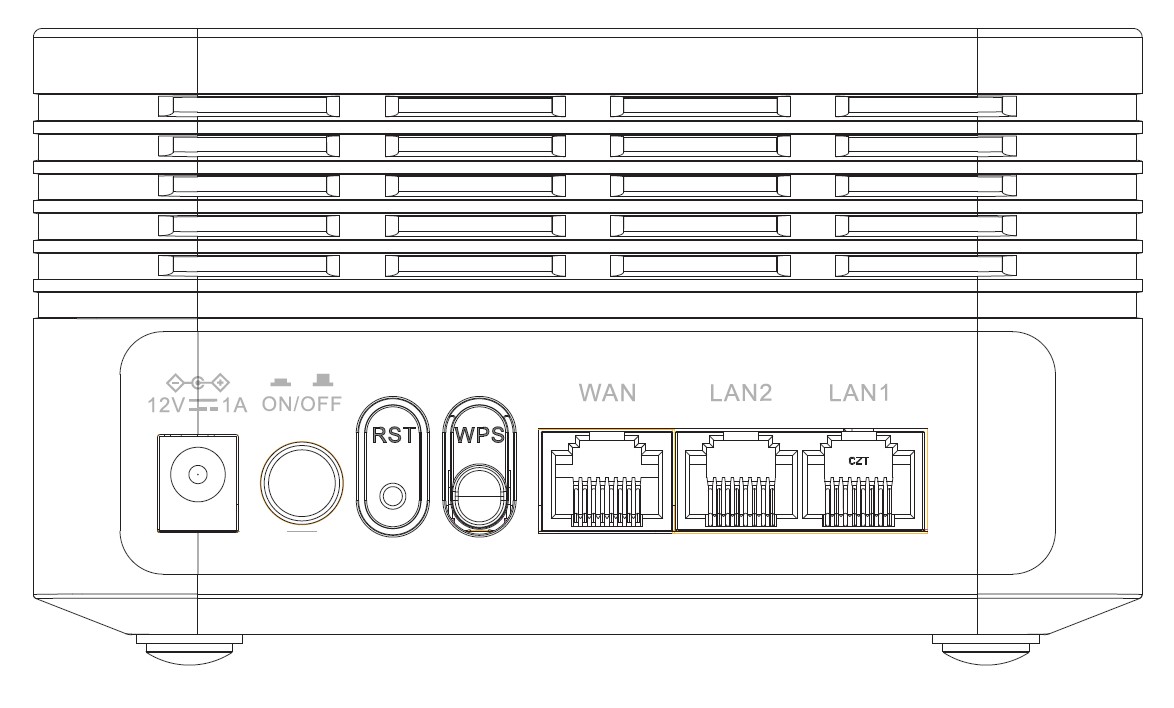
There are 7 ports behind your device:
• 12V1A : It is where you plug the power cable.
• ON/OFF: You can turn on or off your device by simply pressing this button.
• RST: Used to reset your device to its factory settings by inserting a paper clip in it.
• WPS: The WPS button is used to pair different devices together.
• WAN: The WAN port for a RJ45 cable to connect it to your internet box.
• LAN2: It is used to connect one of your personal device to the Mesh via RJ45 to ensure a constant connexion.
• LAN1: It is used to connect one of your personal device to the Mesh via RJ45 to ensure a constant connexion.