ATRIA Wi-Fi 5 Mesh System 2100 (2-pack)
No items found.
No items found.
All questions
ATRIA Wi-Fi 5 Mesh System 2100 (2-pack)
No items found.
No items found.
How do I use the Atria Mesh App?
1Atria Mesh App
Then download the Atria Mesh app.

2Connect to the Wi-Fi
To do so, connect to the Wi-Fi of the Mesh device that is connected to your router/modem.

3Credentials
Enter the username and password (admin/admin) to connect.

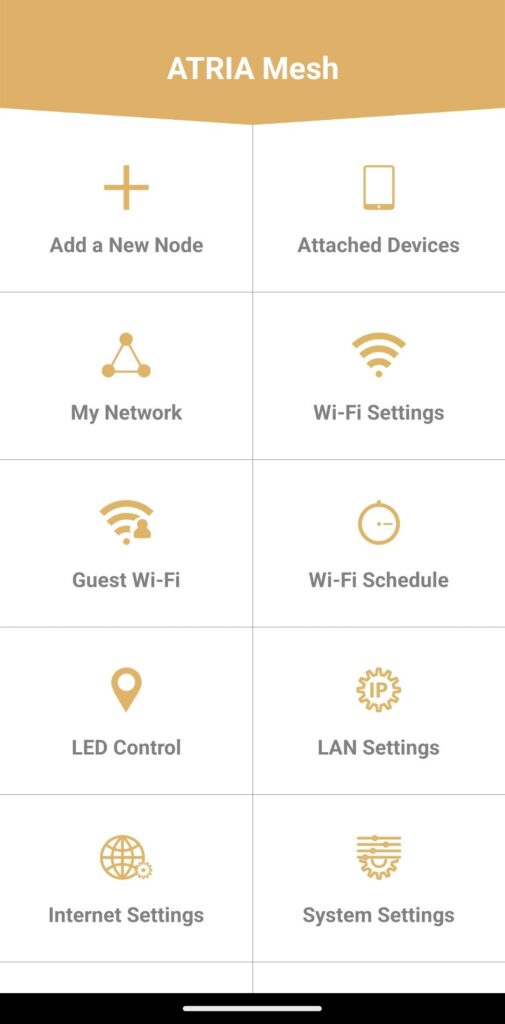
4Main page
Now you are on the main page.
- Add a New Node: Where you can add a new Mesh unit to your Mesh Network.
- Attached Devices: Where you can check which devices are connected to your Mesh Network.
- My Network: Where you can check all the Mesh units connected to your Mesh Network.
- Wi-Fi Settings: Where you can edit and modify the SSID (Wi-Fi Network Name) and Password of your Wi-Fi Mesh Network.
- Guest Wi-Fi: Where you can set-up and configure a 2.4GHz or a 5GHz Guest Wi-Fi.
- Wi-Fi Schedule: Where you can schedule a time period activation for your Wi-Fi Network.
- LED Control: Where you can turn ON or OFF the LEDs of your Mesh unit.
- LAN Settings: Where you can enable or disable a DHCP.
- Internet Settings: Where you can configure a DHCP Connection, a manual DNS, a PPPoE and setup a Static IP.
- System Settings: Where you can modify the Administration User name and Password to access the App.