
4G AIRHOME 200 Mini router with Detachable 4G antennas
All questions
4G AIRHOME 200 Mini router with Detachable 4G antennas
How do I check and edit the APN settings of my service provider?
When your SIM card is not automatically recognized by the device you must login the Web UI to check the APN settings and edit them, if necessary. The APN settings of your service provider can be
found directly on its website, or you can request them to the support service of your service provider.
1Connecy to the Wi-Fi Network of your router
You must connect to the Web UI. To do so, enter the SSID (Wi-Fi Network Name) and Wi-Fi password of the router in your device.

2Browse to the Web UI IP Address
Then, enter the following IP address in your browser: 192.168.188.1

3Enter your credentials
You must enter the Password. Then, click Login.

4Network Settings
Click Network Settings.

5Search the APN information of your service provider
Look for the APN settings on your service provider’s website. You need to write down the following information:
- Name
- APN
- Username
- Password
- Authentication
6Create a manual APN
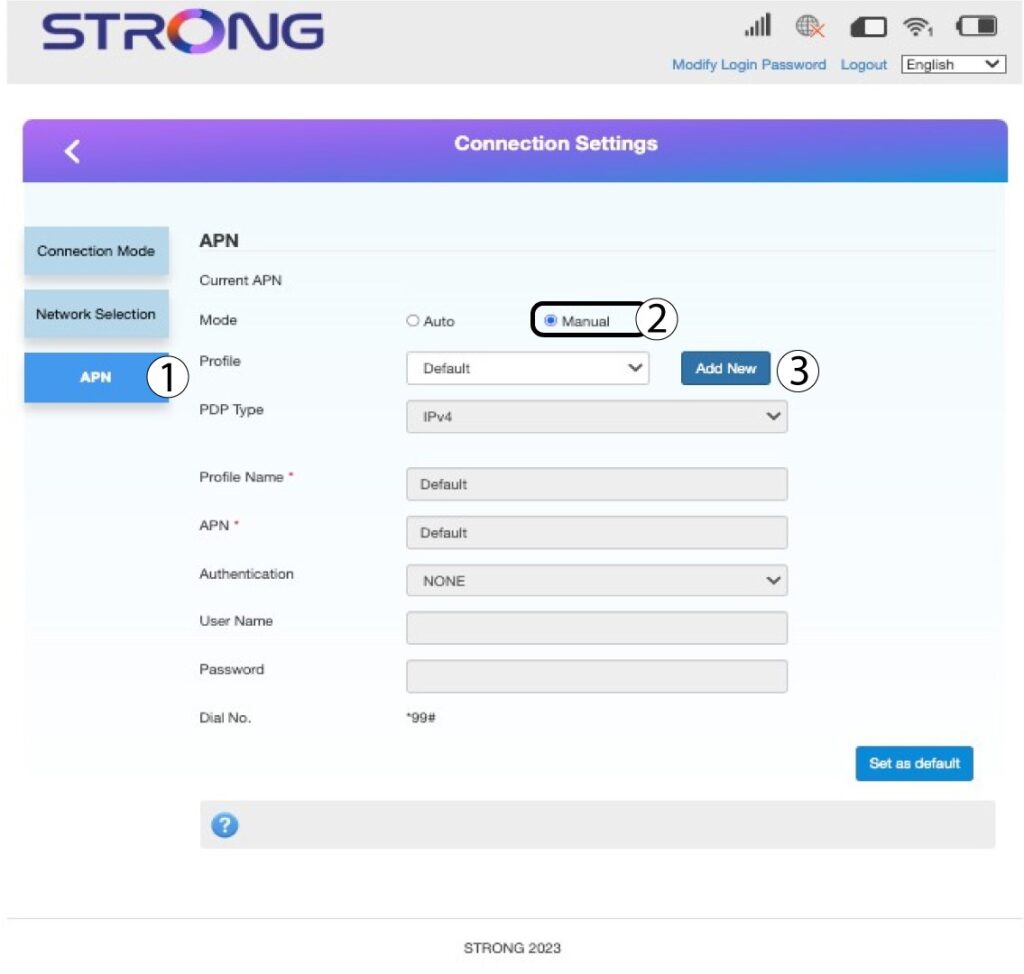
If the information is incorrect, click APN and then Manual and Add New.
7Enter the APN Information
Enter the following information before clicking Set as default:
- PDP Type: select IPv4 as the PDP Type value.
- Profile Name: enter the name of your service provider.
- APN: enter the APN address.
- Authentication Type: Select the Authentication Type defined by your provider for your APN between the following values (NONE, CHAP, PAP)
