
LEAP UNA | FHD Android TV with HDR10+
All questions
Remote control and accessories
How do I pair my remote control?
The remote control pairs automatically during first-time setup. To pair it manually at any time, do it during the boot stage of the device. Follow these steps:
1Remove the main power
Unplug the power cable of the device.
2Wait 5 seconds
Wait 5 seconds before reconnecting the power.
3Insert the main power
Plug the power cable back in.
4Wait for the Google logo
The device boots. Wait until the Google logo is shown on the screen.
5Press BACK and HOME
On the remote, press the BACK and HOME buttons at the same time for 5 seconds, until the LED on the remote blinks.
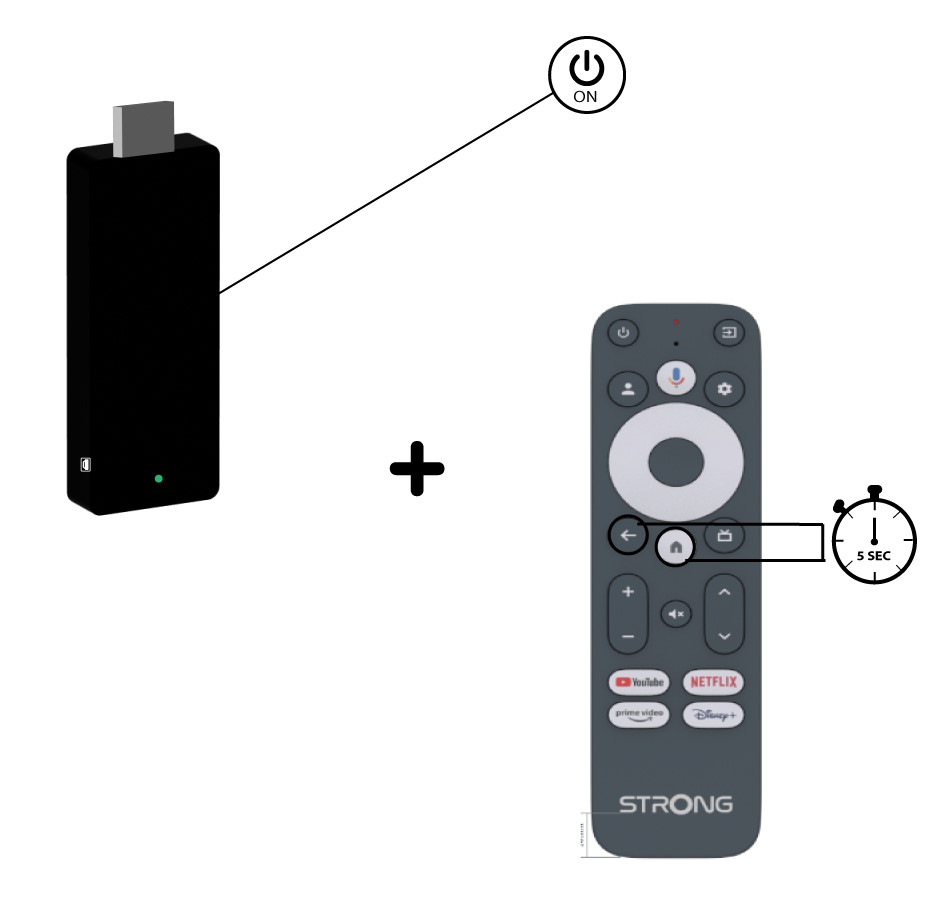
6Confirm the pairing
If the remote is detected, a pairing screen is displayed with a confirmation. The device then goes automatically to the Home screen and can be used.
Note: During re-pairing, keep the remote within 50 cm of the stick.
The remote is not responding. What should I do?
- Check the AAA batteries in the remote (observe +/− markings). Replace if flat.
- Re-pair: remove the LEAP-UNA power, reconnect it, wait until the Google logo appears on screen, then press BACK + HOME simultaneously for 5 seconds until the LED blinks.
- For infrared functions (TV volume, power), point the remote directly at the TV.
Voice search on the remote does not work.
The voice button requires the remote to be paired via Bluetooth. Re-pair it: disconnect the LEAP-UNA power, reconnect, wait for the Google logo on screen, then press BACK + HOME simultaneously for 5 seconds until the LED blinks.
How do I connect a Bluetooth keyboard, speaker, or headset?
- Go to Settings > Remotes & accessories > Add accessories.
- Press OK to start scanning.
- Put the Bluetooth device in pairing mode.
- Select it from the list and press OK. Enter a PIN if prompted.
How do I remove a Bluetooth device?
- Go to Settings > Remotes & accessories.
- Select the device.
- Press OK and choose Remove (Unpair).