
4G LTE Router 300 Mini UK
All questions
SIM card and mobile network
How do I change the SIM Card PIN Code?
1Connect to the Wi-Fi of the router
You must connect to the Web UI. To do so, enter the SSID and password of the router in your device.

2Browse to the Web UI IP Address
Then, enter the following IP address in your browser: 192.168.0.1

3Login Page
Once you have browsed to the IP Address, click Login.

4Enter your credentials
You must enter the Username and Password. Then, click Login.

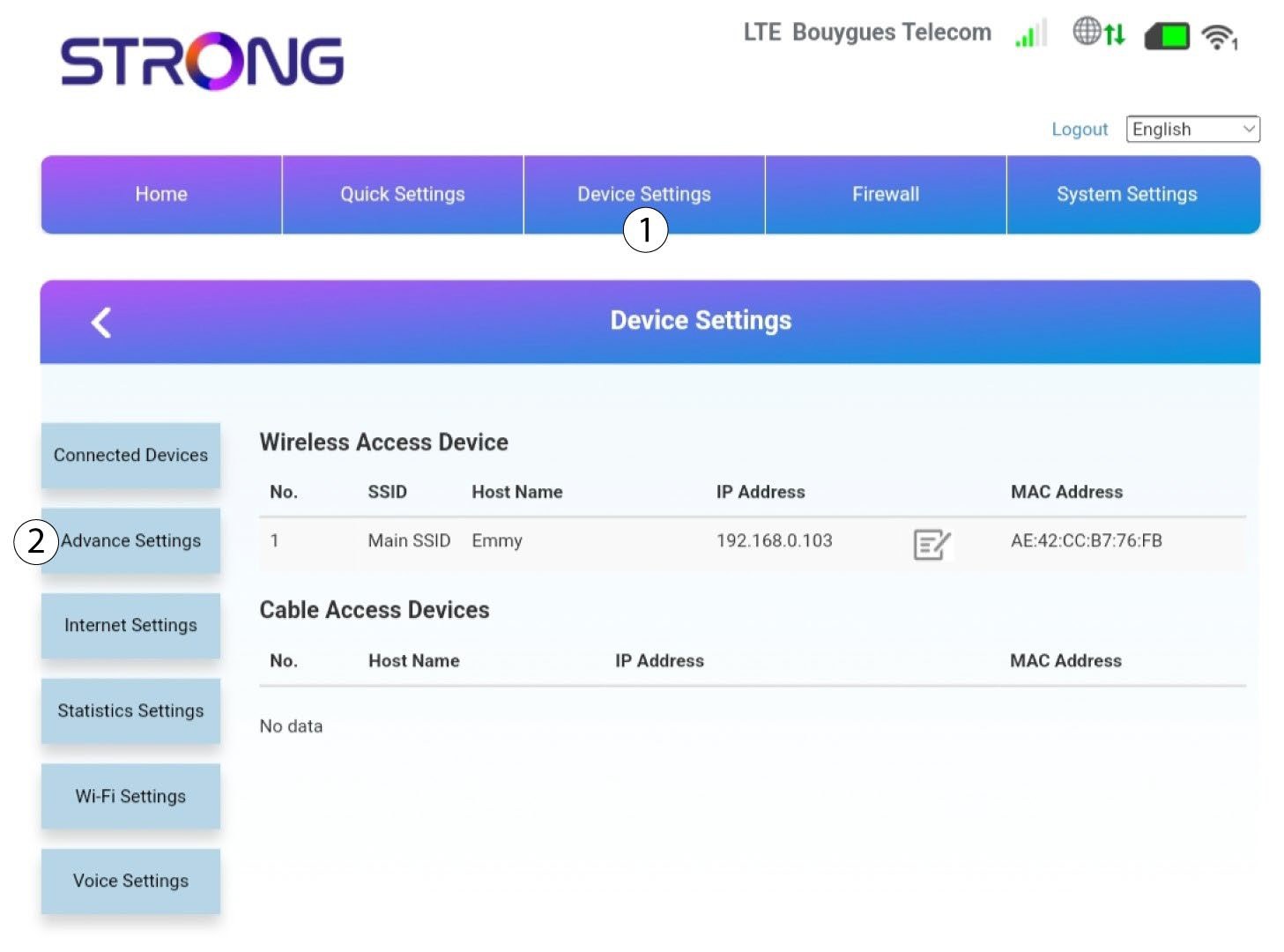
5Advance Settings
Then, click on Device Settings and on the Advance Settings tab.
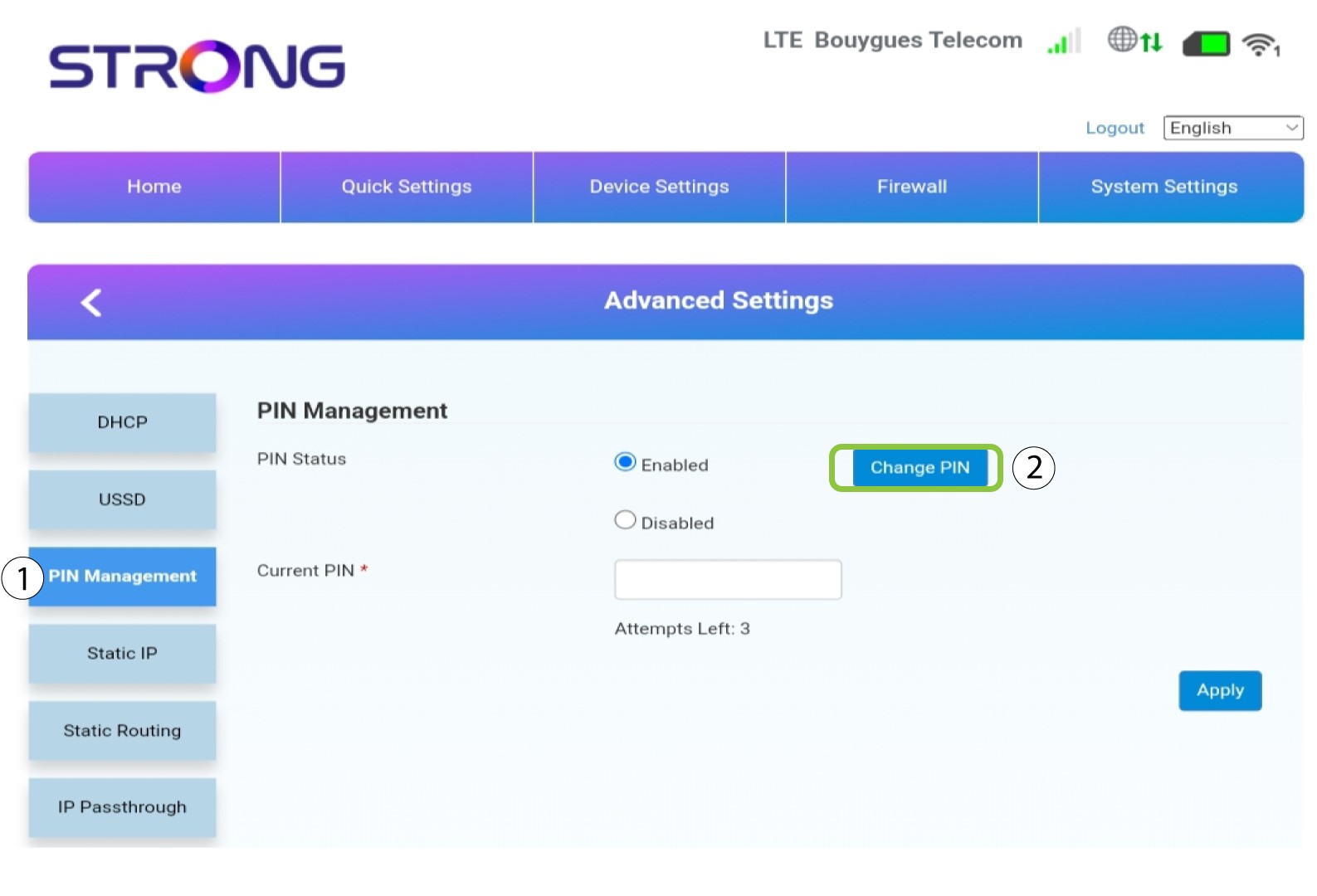
6PIN Management
Click PIN Management and Change PIN.
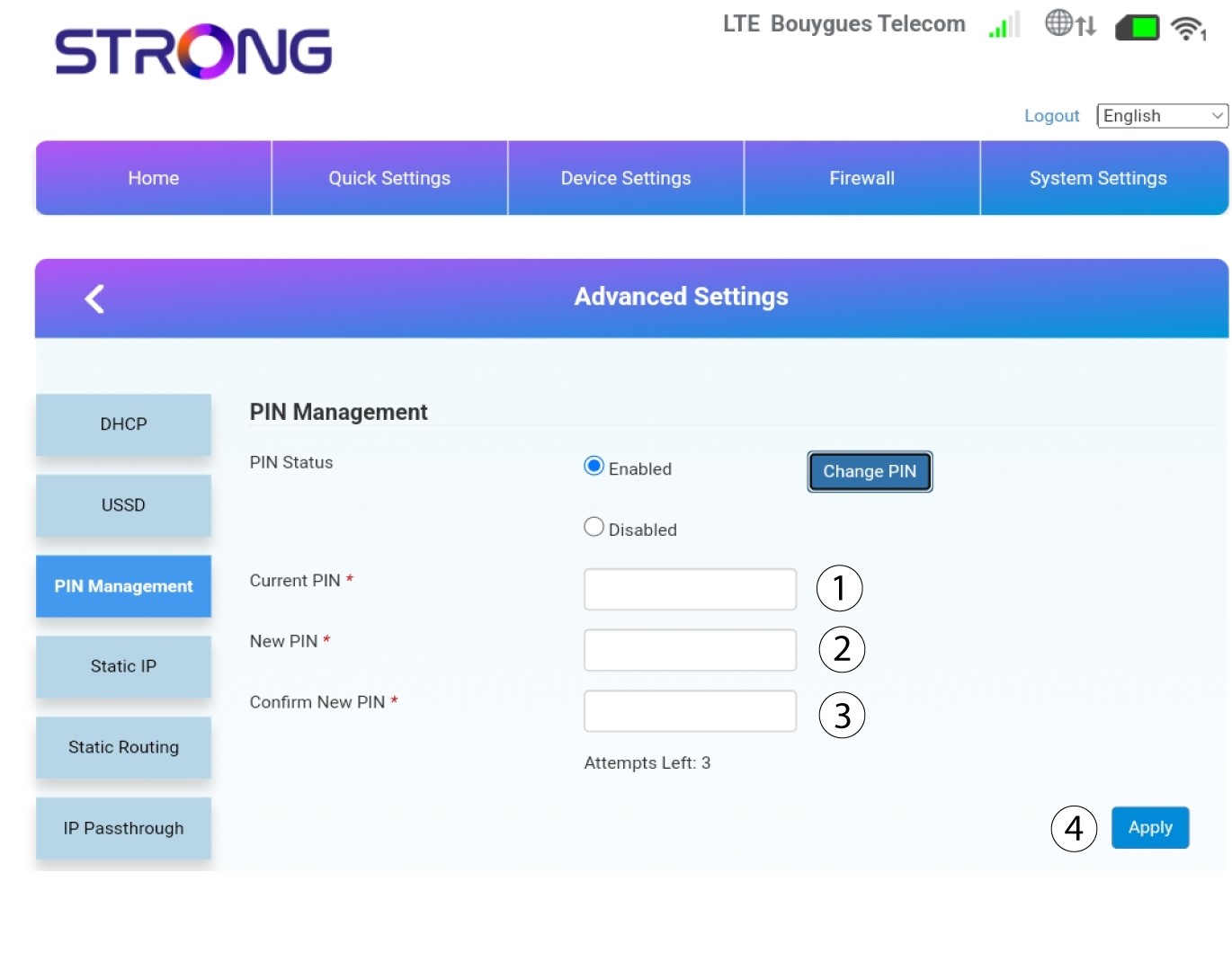
7Ser the new PIN code
Enter the following information and click Apply:
• Current PIN: enter the PIN code of your SIM card.
• New PIN: Enter the new pin code.
• Confirm New PIN: Enter the same pin as in the previous field.
How do I check and edit the APN settings of my service provider?
When your SIM card is not automatically recognized by the device you must login the Web UI to check the APN settings and edit them, if necessary. The APN settings of your service provider can befound directly on its website, or you can request them to the support service of your service provider.
1Connect to the Wi-Fi of your router
You must connect to the Web UI. To do so, enter the SSID and password of the router in your device:
2Browse to the Web UI IP Address
Then, enter the following IP address in your browser: 192.168.0.1
3Login Page
Once you have browsed to the IP Address, click Login.
4Enter your credentials
You must enter the Username and Password. Then, click Login.
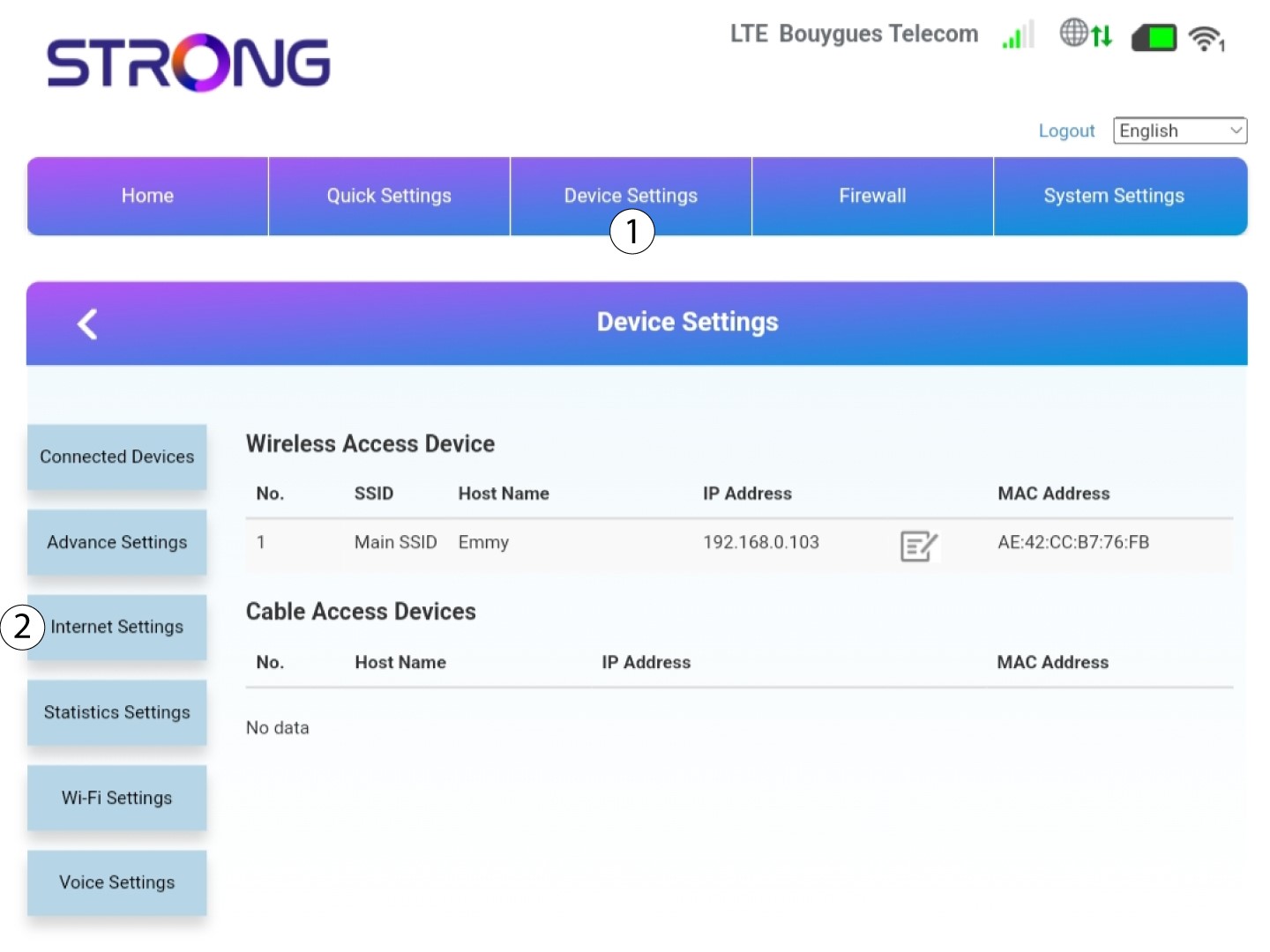
5Internet Settings
Click Device Settings and then Internet Settings.
6Check your provider's APN Settings
Look for the APN settings on your service provider’s website. You need to write down the following information:
- Name
- APN
- Username
- Password
- Authentication Type
7APN Settings
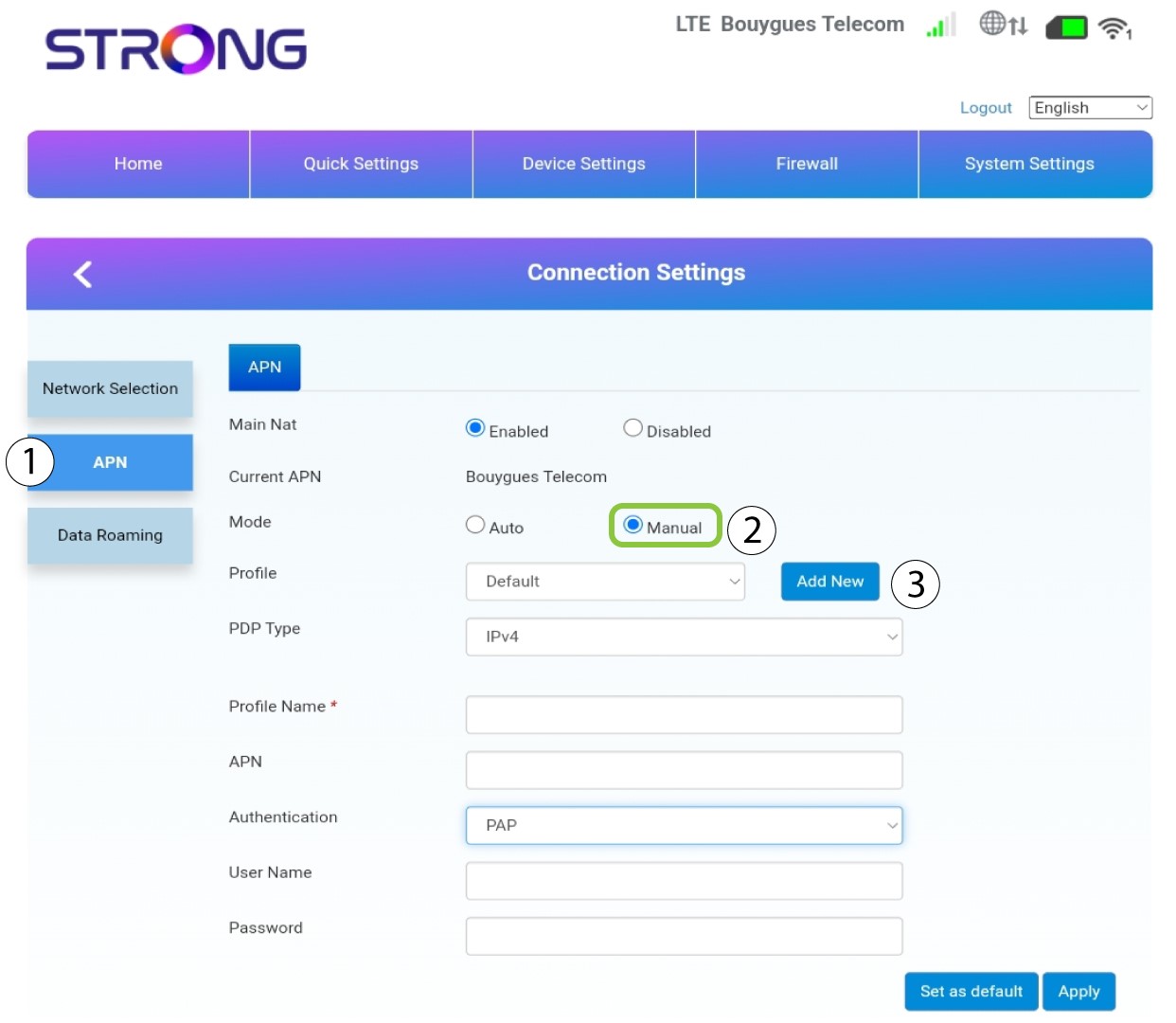
Edit the APN settings if the information is incorrect. To do so, click APN. Then, click Manual and Add New.
8Choose the PDP Type
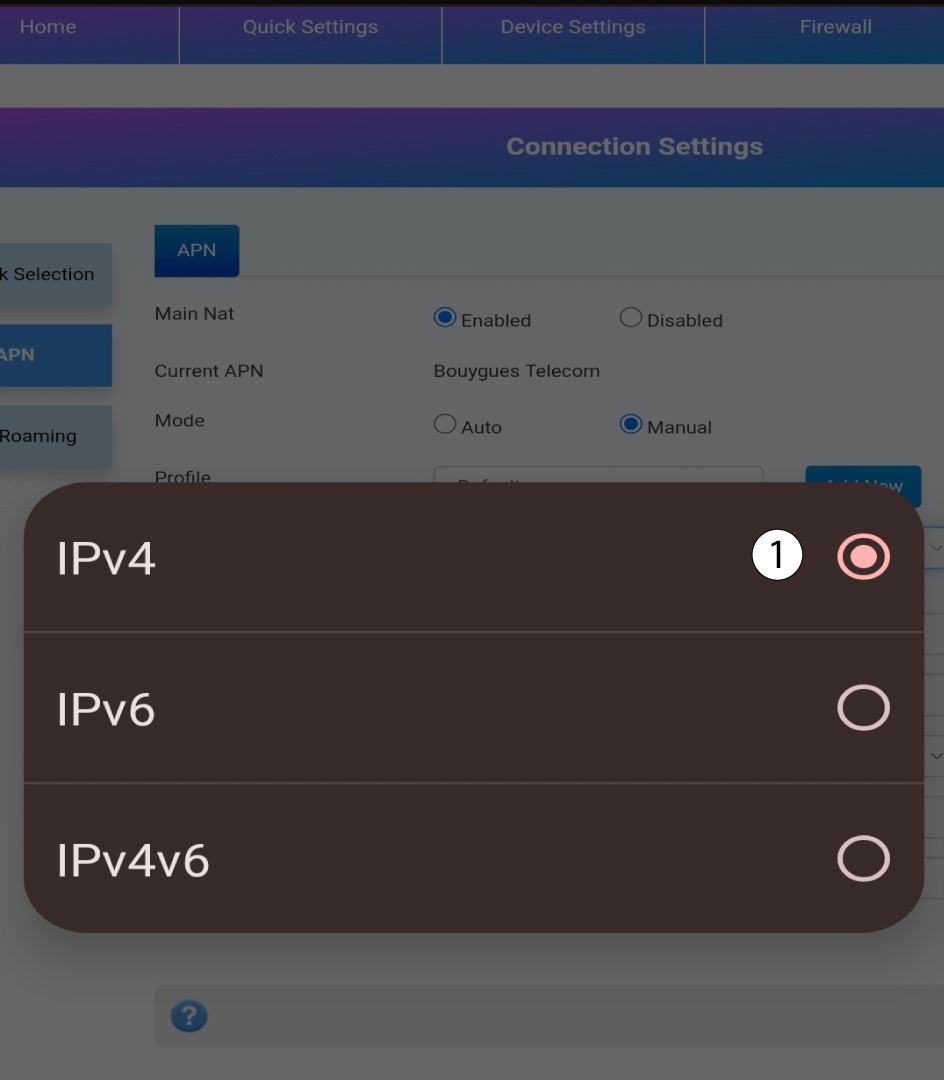
In the PDP Type field, select the correct APN Type between IPv4, IPv6 or IPv4v6.In our case the PDP Type is IPv4.
9Enter your service provider information
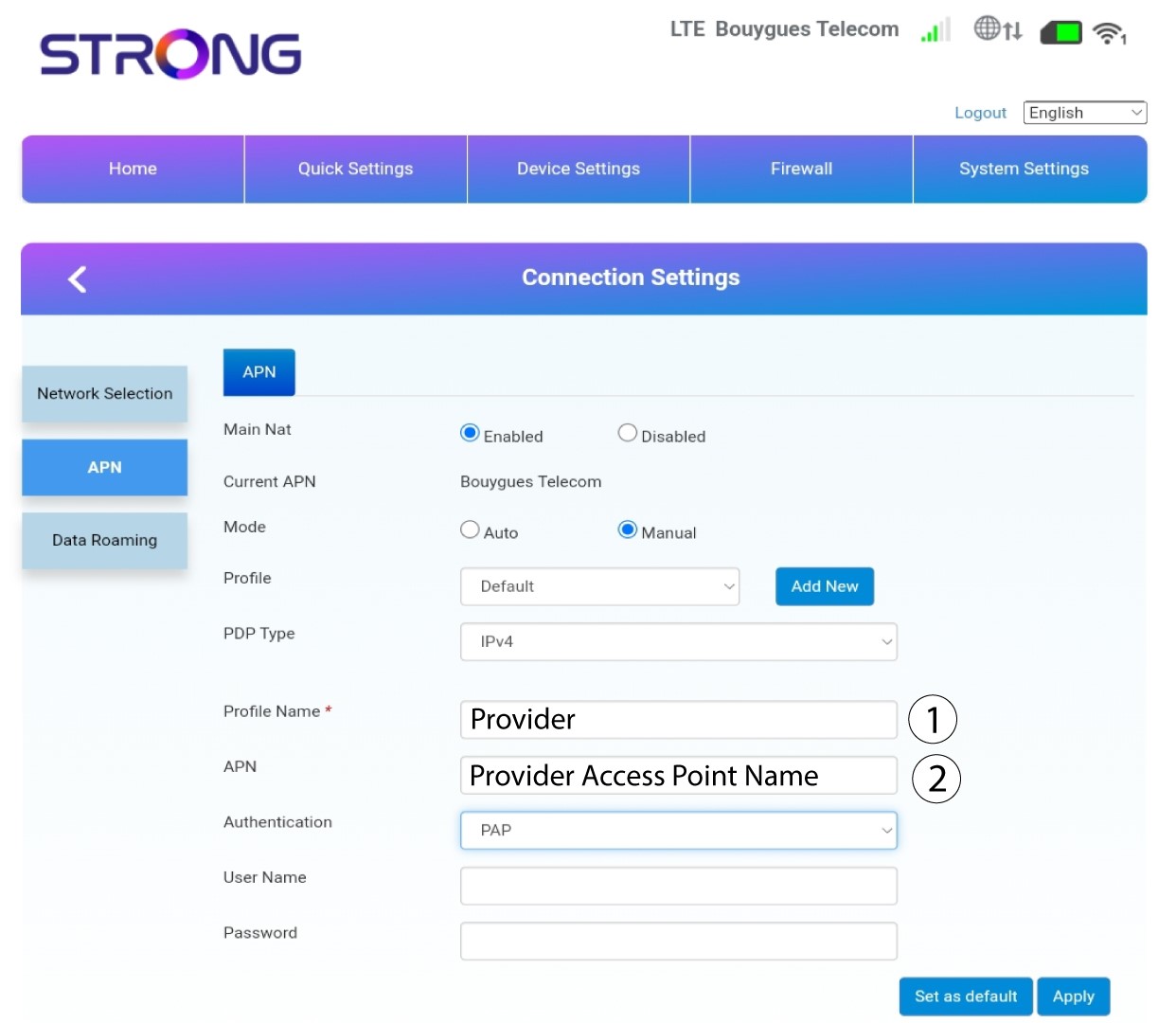
Enter the name of your service provider in the Profile Name (Limited to 14 characters, including spaces). Then enter the APN address in the APN field.
10Specify the authentication type
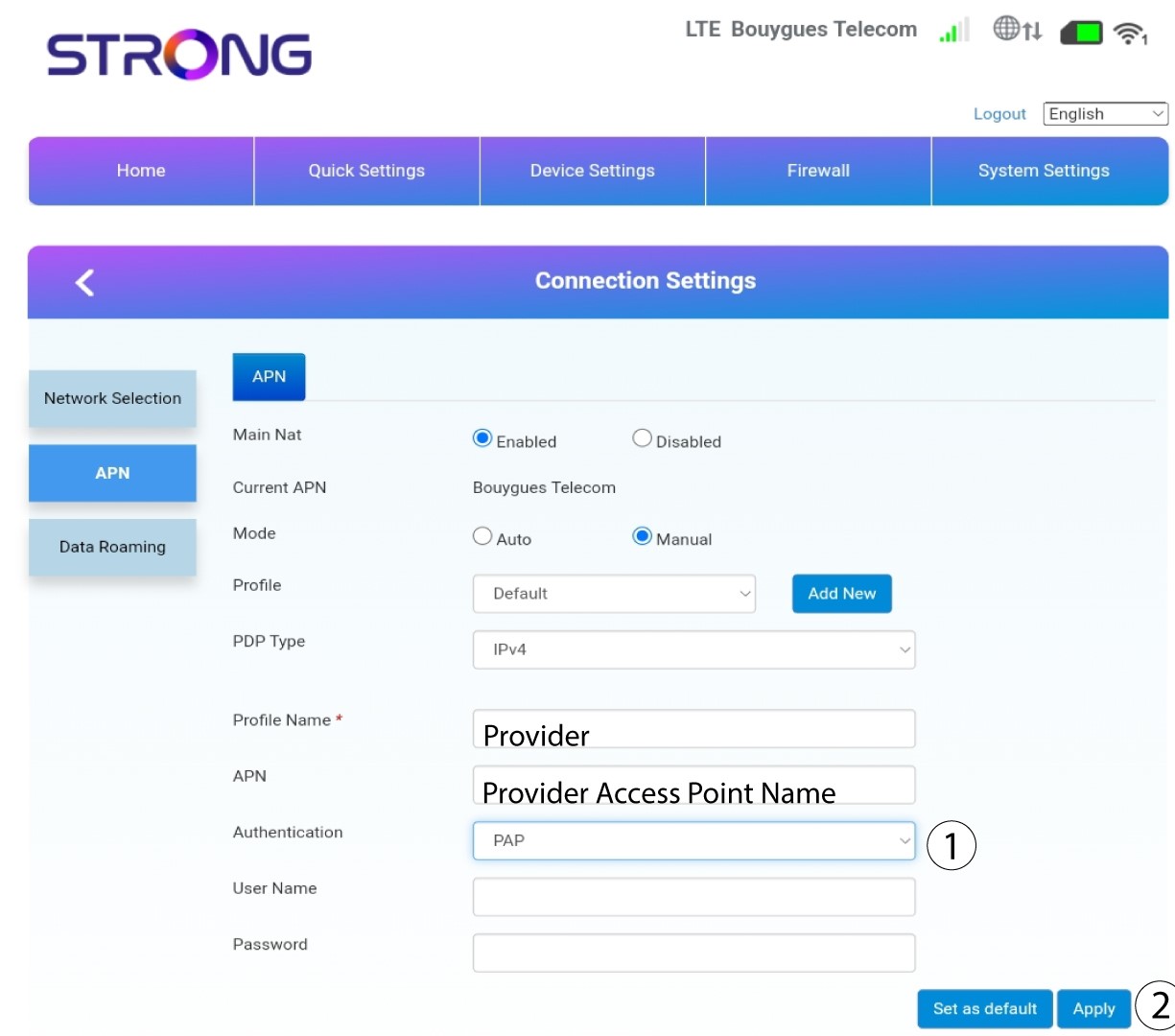
Select the Authentication Type defined by your provider for your APN between the following values and click Apply:
• NONE,
• CHAP
• PAP
How do I deactivate the SIM card PIN code?

Before deactivating your PIN code you must connect to the Web UI to enter your PIN code for the first time and unlock the SIM card.
1Connect to the Wi-Fi
You must connect to the Web UI. To do so, enter the SSID and password of the router in your device.
2Browse to the Web UI IP Address
Then, enter the following IP address in your browser: 192.168.0.1
3Login Page
Once you have browsed to the IP Address, click Login.
4Enter your credentials
You must enter the Username and Password. Then, click Login.
5Advanced Settings
Then, click on Device Settings and on the Advanced Settings tab.
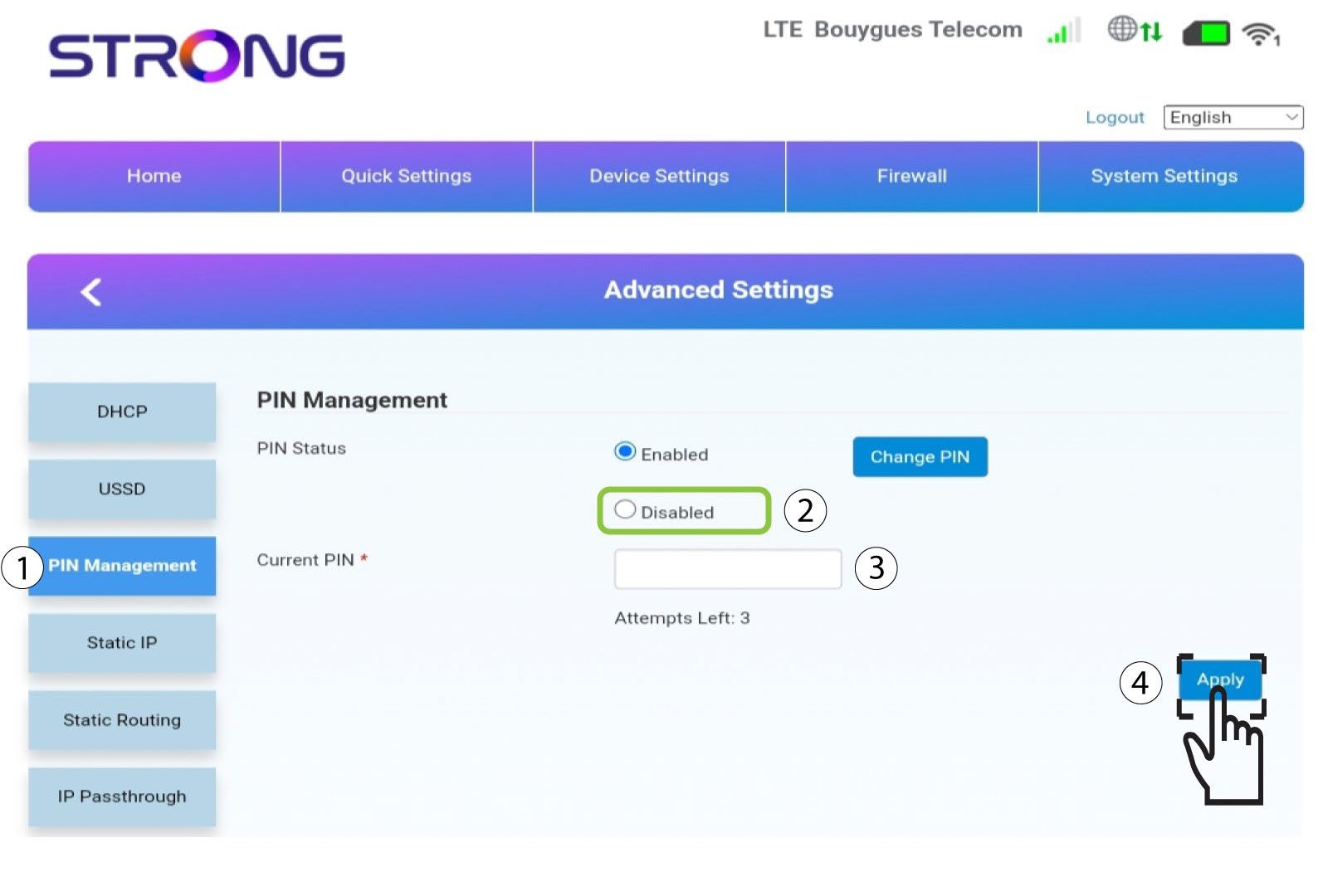
6Disable PIN Code
Click PIN Management and select Disabled. Then, enter the Current PIN code and click Apply.
How do I enter my SIM PIN code?
To enter your SIM PIN code, you must connect to the Web UI.
1Connect to the Wi-Fi of your router
To do so, enter the SSID and password of the router in your device:
2Browse ro the Web UI IP Address
Then, enter the following IP address in your browser: 192.168.0.1
3Login Page
Once you have browsed to the IP Address, click Login.
4Enter your credentials
You must enter the Username and Password. Then, click Login.
5Enter your PIN code
When login in for the first time in the Web UI, you are automatically directed to the PIN code page.
Enter your PIN code in the field and click Apply.
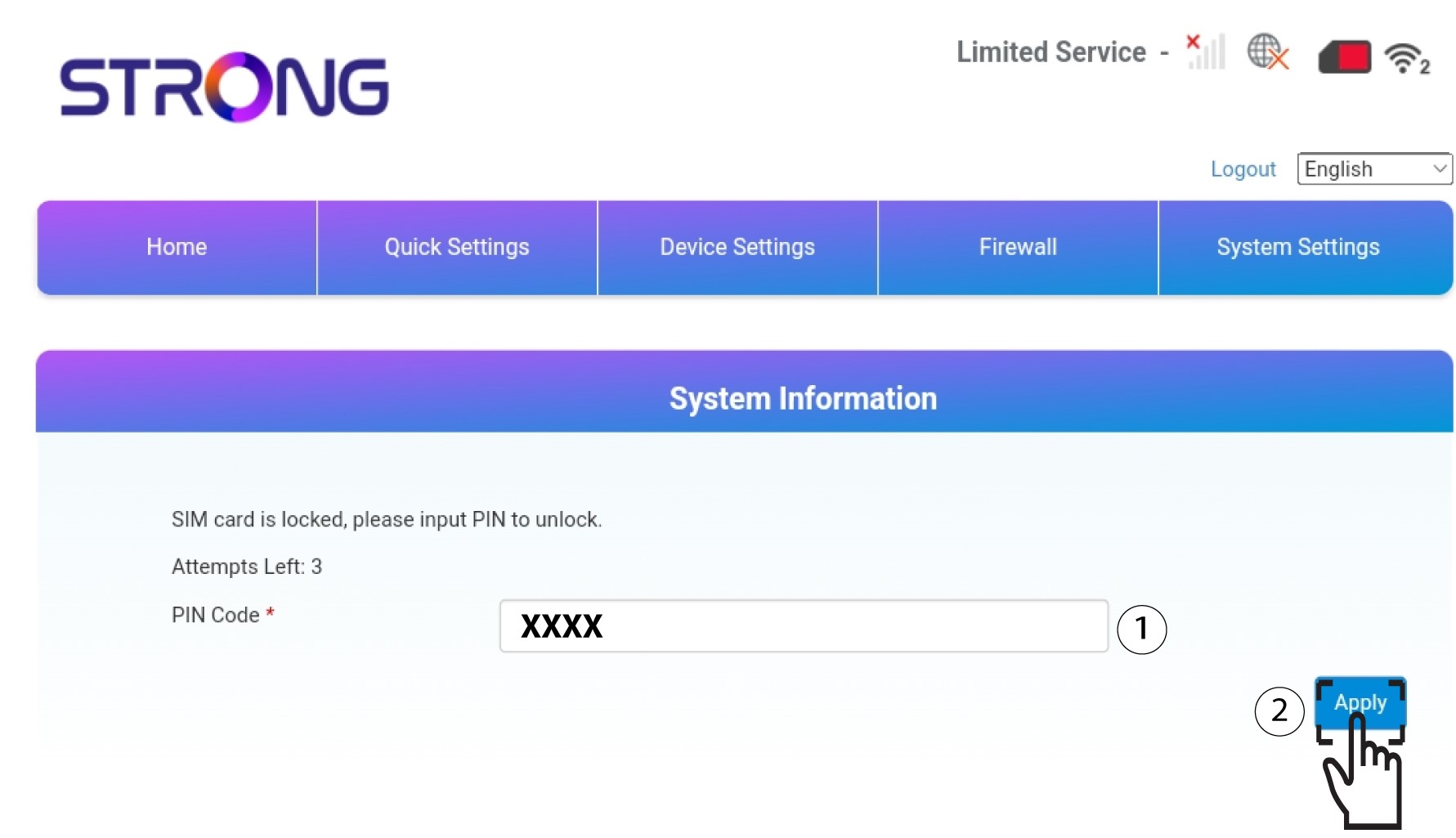
6SIM card is unlocked
The SIM card is unlocked, and its icon now turns green with the network name next to it.

I don’t have internet after inserting my SIM card in the router, why?
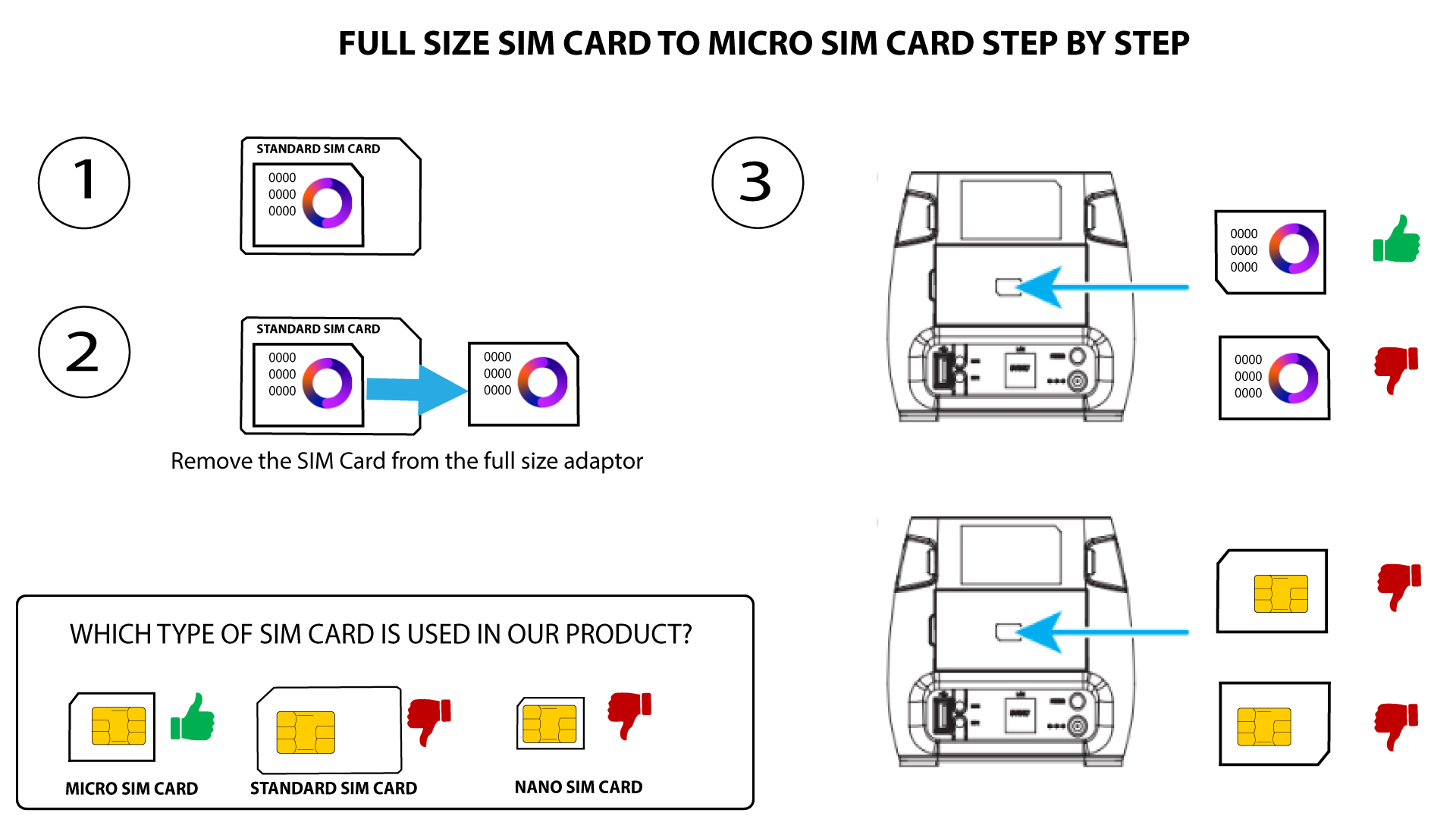
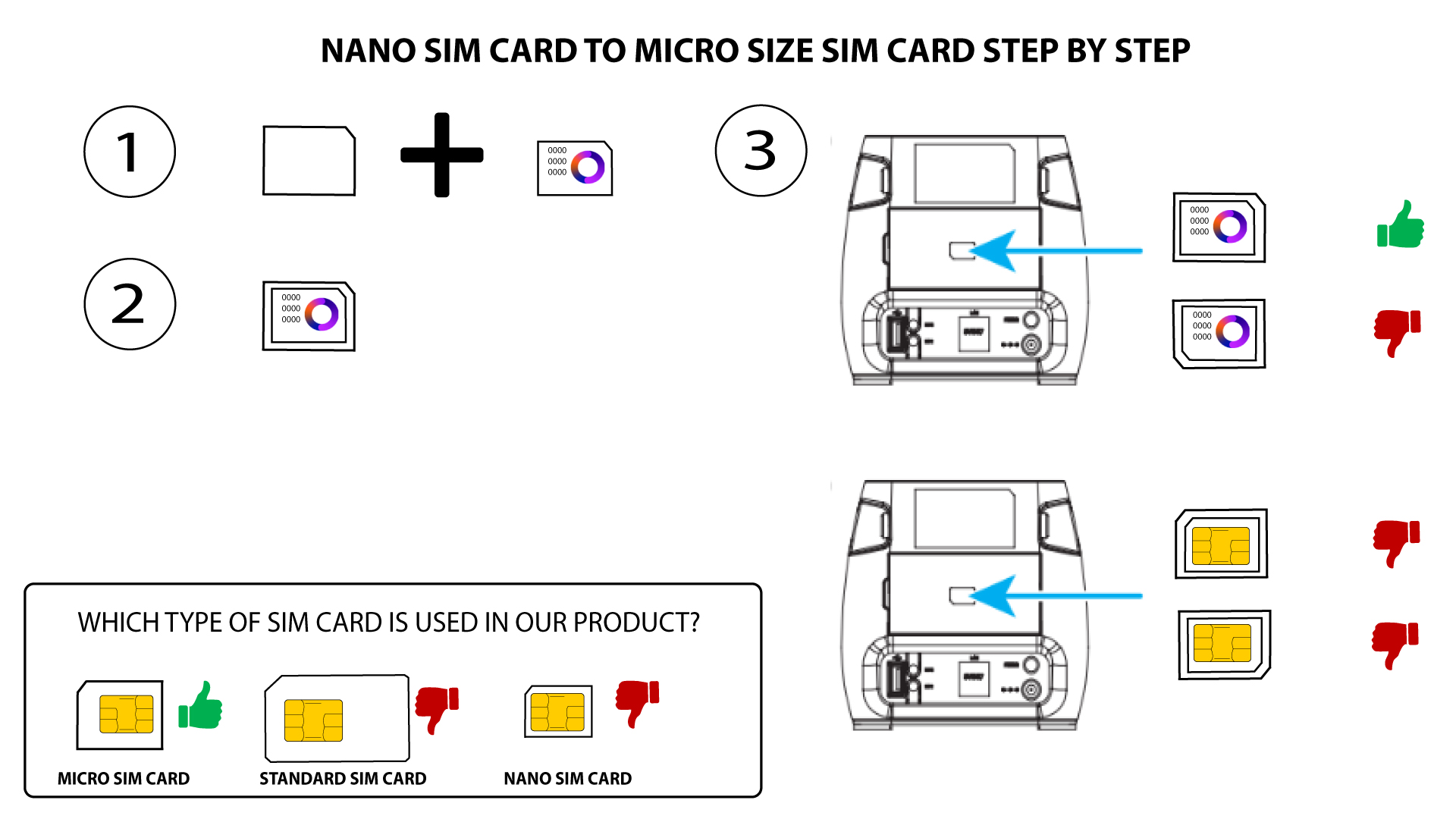
There are many reasons that can explain that your internet connection is not working after inserting the SIM card. The first one can be that the SIM card is not inserted properly, please check the position of the SIM card by referring to the schema that shows the insertion procedure.
1Case 1: Full size SIM card
2Case 2: Nano SIM card
- Another reason can be that your SIM card is locked by a PIN. To unlock it, you must connect to the Web UI and enter the PIN code. Please follow the procedure described in the following section: How do I enter my SIM PIN code?
- Finally, it is also possible that your SIM card is detected but not automatically recognized by the device. In this case, you must connect to the Web UI and check the APN settings of your service provider. This procedure is explained in the following section: How do I check and edit the APN settings of my service provider?
What does the colour of the SIM card icon mean in the Web UI?
When you are logged in the Web UI the SIM card icon can be green or red.
- If the icon is red, it means that the SIM card is either locked due to the PIN code or not detected and that there is no connection in each case.

- If the icon is green, your SIM card is detected, unlocked, and working.
What is the meaning of the different SIM card statuses in the Web UI?
Before connecting to the Web UI, make sure that your SIM card is properly inserted and that the PIN is disabled or entered.
Once you are in the Web UI, you can notice that several statuses can be written next to the SIM card status line:
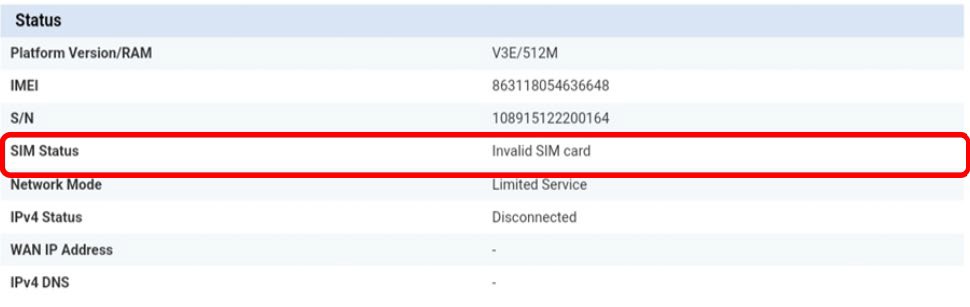
Invalid SIM card: The SIM card is inserted and detected but not working due to the PIN code.
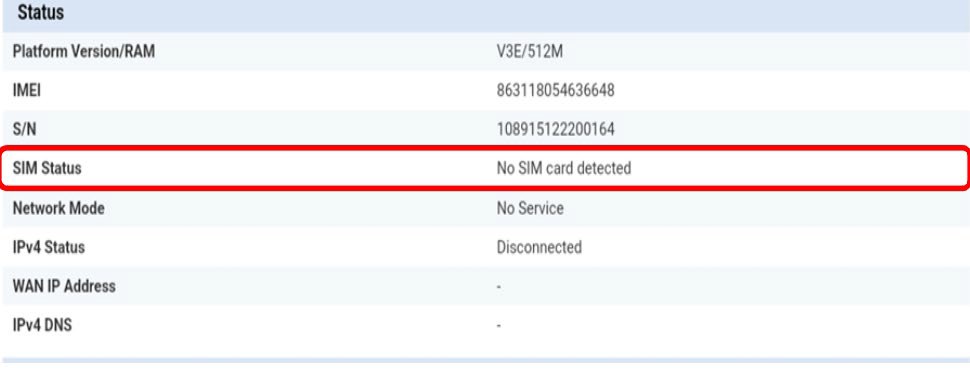
No SIM card detected: The SIM card is not properly inserted in the device, or no SIM card is inserted in the slot.
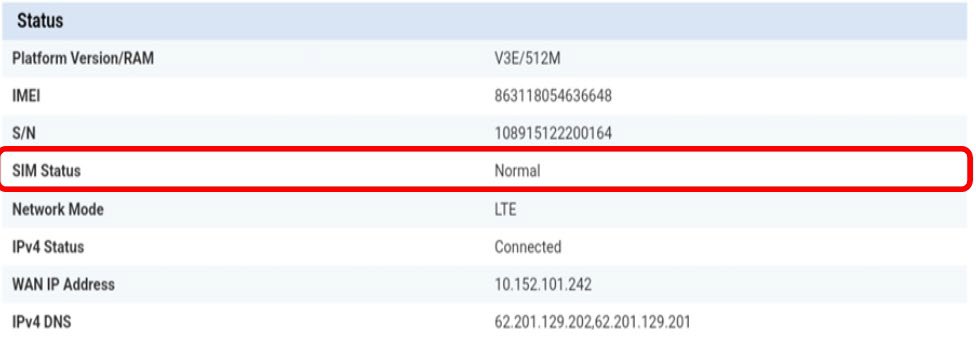
Normal: The SIM card is properly inserted in the device and unlocked.
• If the SIM card is locked with a PIN code, you must connect to the Web UI to enter it and unlock the SIM card.
• If the SIM card is not detected, please check that the golden side is not visible when the SIM card is inserted in the slot.
• If the SIM card is not positioned properly, reposition it in the slot and check that the SIM card is still in the adapter.
What type of SIM card can I insert in my router?
A micro-SIM card must be inserted in the SIM card slot of the 4G LTE Router 300M. You don’t have to worry about the size of your SIM card as adapters are provided within the router package to have the right size. You must insert your SIM card before switching on the device.
1Case 1: Full Size SIM Card
Once you put the SIM card in the adapter, keep pressing the SIM card in the adapter to maintain it. Take the device in your hand and insert the SIM card in the slot in the same position as the schema below.
2Case 2: Nano SIM Card
Once you put the SIM card in the adapter, keep pressing the SIM card in the adapter to maintain it. Take the device in your hand and insert the SIM card in the slot in the same position as the schema below.
Make sure that your SIM card is properly positioned in the adapter before inserting it into the slot.
If your SIM card is not detected by the device, please check its position and if you inserted the adapter the right way.
What type of connector is used for our antennas? Is it possible to use a SMA connector for an external antenna?
The Antenna connectors of 4G LTE Router 300M are compatible with SMA.
To install a new 4G antenna on the router, you must unplug the device. Then you must unscrew the antenna located on the right side when looking at the rear of the device. Once this is done, you must screw the SMA connection cable of your new 4G antenna in this location.
Please note that the left antenna of the device only enables reception whereas the right antenna enables transmission and reception.