
No items found.
No items found.
DOVY BATTERY BABYCAM
All questions
No items found.
No items found.
LEDs, buttons and ports
What do the LED colours mean?
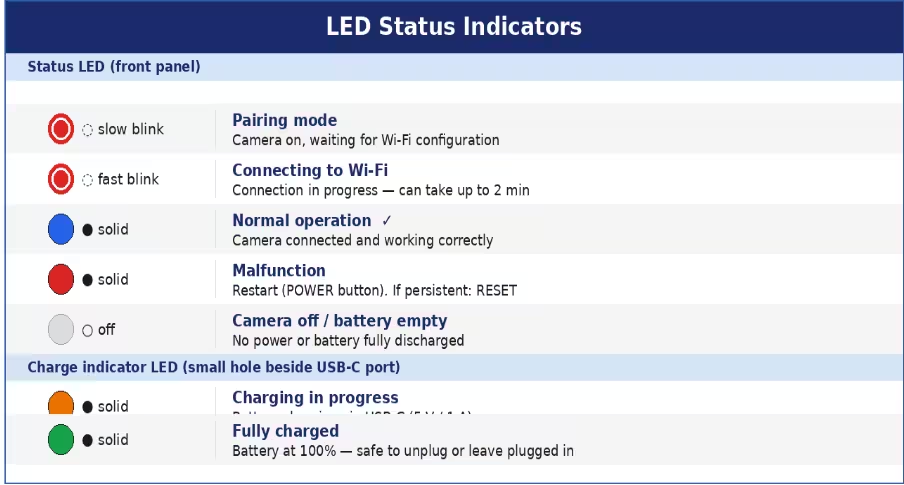
- Slow blinking red: camera is on and waiting to be paired. Pairing mode is active.
- Fast blinking red: Wi-Fi connection in progress (can take up to 2 minutes).
- Solid blue: normal operation — camera is connected and working correctly.
- Solid red (during operation): malfunction. Restart the camera with the POWER button. If it persists, press RESET.
- No LED: camera is off or battery is fully discharged.
- Charge indicator (small hole near USB-C) — orange: charging in progress. Green: battery fully charged.
Tips: If the blue LED disturbs your baby's sleep, you can disable it in the app: Settings (⚙) > Network Indicator > Disable. The camera continues to operate normally.
Battery is draining quickly / How do I get the best battery life?
The internal 3,350 mAh battery provides approximately 4 hours of autonomy. For continuous overnight monitoring, the camera must be plugged in via USB-C.
- Use Event Recording instead of All Day Recording in Settings > Recording Management.
- Reduce video quality to SD in the Live view.
To configure a low battery alert: Settings (⚙) > Battery Management. Set the Low Battery Alert threshold (10%–50%). A threshold of 20% is recommended.
Warning: Use only a standard 5 V / 1 A USB charger. Fast chargers above 5 W are not compatible and may damage the battery.